
Purpose: The year-end close process ensures the County’s financial statements accurately reflect the financial position at the end of the fiscal year. Additionally, by reviewing these purchasing transaction items, we are prepared to fulfill the requirements of our suppliers efficiently.
Need assistance?
Please email ALL requests to Help.Munis@deschutes.org
Timeline:
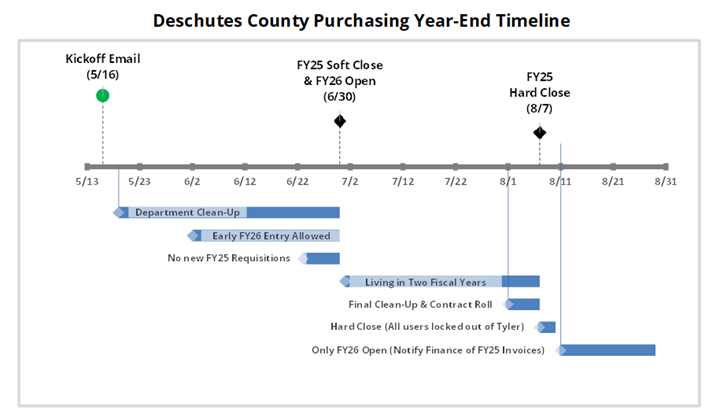
Department Clean-Up (May 19, 2025 through June 30, 2025)
Departments clean-up/close any outstanding requisitions, purchase-orders, contracts, or invoices. The following will outline how to clean those up before year-end.
Requisitions
Departments review their requisitions to determine if any are in a status of “rejected”, “created” or “allocated”. If these requisitions are no longer needed in FY25, they should be deleted.
Delete Requisition - Go to ‘Requisition Entry’ module in Tyler ERP and search requisitions by creator name or department. To delete these items, isolate each requisition individually (search by individual requisition number), then click the delete button (trash bin symbol).
Purchase Orders
If all the invoices are paid on a PO for the year and/or will no longer be used, cancel or close the PO. Canceling a PO is used when nothing has ever been spent on a PO. Closing a PO is used to reduce lines that have already been spent and have remaining funds. Do not close POs that may have a pending payment due for June 2025.
Cancel PO – Go to ‘Purchase Order Change Orders’ within Tyler ERP and search for the PO to cancel. Once you have opened the PO on your screen that you want to cancel, hit the “Cancel PO” button in the menu.
Close PO – Go to ‘Purchase Order Change Orders’ within Tyler ERP and search for the PO to cancel. Once you have opened the PO on your screen that you want to close, hit the “Close PO” button in the menu.
Note: If there is an outstanding invoice that is in process, you will be stopped from cancelling. Be careful not to cancel any PO’s for FY25 expenditures that you expect to receive corresponding invoices for after June 30, 2025.
Purchase Order Receiving - Enter receiving records based on the actual date goods or services were physically received and attach support verifying physical receipt. Be sure to use date received and not the date entered into Munis.
- Items received through 06/30/2025 will be expended against the FY25 budget.
- Items received on or after 07/01/2025 will be expended against the FY26 budget.
Outstanding Orders - If an item is on order and not yet received or paid, the PO should remain open unless the order is formally canceled. Trouble shoot items that have been on order for a long time, but not received. Work with your Procurement Department Liaison if you need to cancel a pending order.
Department Clean-Up (May 19, 2025 through June 30, 2025)
Contracts
Departments review contracts to determine if any are in “rejected” or “created” status that need to be deleted. Additionally, if a contract has been fully spent down and the Department will not be doing a change order, then those contracts need to be “closed”. Contracts rolled over to the next fiscal year (contract rolls) are detailed below.
Delete Rejected/Created Contracts – Go to ‘Contract Entry’ within Tyler ERP and isolate, by search, for a specific contract number. Contracts to delete will have a rejected/created status. Once isolated, click the delete button (trash bin symbol). This can be repeated for change orders in the ‘Contract Change Order’ screen. Prior to deleting, ensure that you no longer need the contract.
Close Contracts – Go to Contract Change Orders and isolate, by search, for a specific contract number. Then select “more” and choose “close contract”. Prior to closing, verify that you are finished with the contract.
Invoices
Departments should review their open invoice batches for stale/unnecessary invoices in FY25 that DO NOT need to be paid.
Delete Invoices – Go to ‘Invoice Entry’ in Tyler ERP, browse for all AP batches, and select a specific batch based on clerk. View the Batch, and the specific invoice. Once the specific invoice is isolated, click the delete button (trash bin symbol).
Early FY26 Entry Allowed (June 1, 2025 through June 30, 2025)
Beginning June 1st, departments may enter FY26 requisitions, purchase orders, contracts, or invoices in advance of the new fiscal year. However, transactions submitted in advance to FY26 will not be processed for payment until the County has a legal budget in place to spend funds (July 1, 2025).
Requisitions – Departments may create requisitions for FY26 by selecting Fiscal Year 2026 in the Requisition Entry module. REQs may be submitted into workflow for approval.
Purchase Orders – Departments may modify FY26 purchase orders (i.e. approved requisitions). Purchase Orders may be submitted into workflow for approval.
Contracts – Departments may create new contracts with line items for FY26. Contracts may be submitted into workflow for approval.
Early FY26 Entry Allowed (June 1, 2025 through June 30, 2025)
Invoices – Departments may submit invoices against FY26 for payment (first AP check run is July 3, 2025).
This is accomplished by:
- Using an Invoice Batch that has an effective date of 07/01/2025 or later AND,
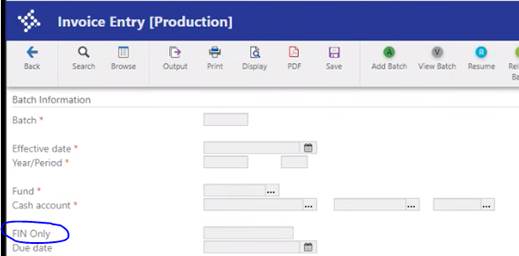
- Entering “FY2026” in the FIN Only box (screenshot below)
- Release invoices into workflow for approval.
No NEW Requisitions in Fiscal Year 2025 (June 23, 2025 through June 30, 2025)
Finance will review and ask questions about outstanding FY25 requisitions, purchase orders, contracts, or invoices. This will allow the Department to make any necessary changes prior to year-end.
Department end-users are blocked from inadvertently creating requisitions against the ending fiscal year. A system-wide stop will be put into place in Tyler ERP. Exceptions will be granted for Departments by request (Contact Haether if needed).
Living in Two Fiscal Years (July 1, 2025 through August 7, 2025)
The intent of this period is to allow Departments to process against either Fiscal Year for select transactions. Only Invoices can be processed against the previous fiscal year.
Requisitions – Fiscal Year 2026 processing ONLY.
Purchase Orders – Fiscal Year 2026 processing ONLY.
Contracts – Fiscal Year 2026 and beyond processing ONLY.
Invoices – Fiscal Year 2025 OR 2026 processing BOTH.
Fiscal Year 2025 Batches – Ensure that the effective date is prior to July 1, 2025. For the year end period, ensure they are set to 2025 and period 12. Also make sure the “due date” is prior to July 1, 2025.
Fiscal Year 2026 Batches - Ensure that the effective date is July 1, 2025 or later. For year end period, ensure they are set to 2026 and period 1. Make sure the “due date” is July 1, 2025 or later. Enter FY2026 into the FIN Only box.
Final Clean-Up and Contract Roll (August 1, 2025 through August 7, 2025)
The intent of this time period is to allow Departments to notify Finance of any contract balances still remaining in FY25 that they want “rolled” to FY26 for spending. Furthermore, this will be a second review performed by Finance to ensure all 2025 requisitions, purchase orders, contracts and invoices have been handled properly. Finance will coordinate with each department to determine the appropriate action for all items.
Requisitions – All FY25 requisitions still pending workflow approval will be deleted by Finance.
Purchase Orders – All FY25 purchase orders still pending workflow approval will be deleted by Finance.
Contracts – All FY25 contract line amounts will be rolled to FY26 line amounts by Finance. Departments will be consulted on which amounts can be cancelled.
Invoices – All FY25 invoices will need to be either deleted or through approval workflows by August 7th.
Day Prior to Year-End Close (August 6, 2025)
Any activity related to FY25 or FY26 requisitions, purchase orders, contracts, contract change orders, and invoices not in the “Posted” status as of this day will have to be DELETED.
Only Fiscal Year 2026 Open (Starting August 11, 2025)
The new fiscal year 2026 is officially open and is the only option for all Department transactions except invoices.
FY25 Invoices received between August 11, 2025 and August 28, 2025:
If you receive an invoice for goods/services provided in FY25, we can still process these through AP using FY25 period 13.
Fiscal Year 2025 Batches – Ensure that the effective date is prior to July 1, 2025. For the year end period, ensure they are set to 2025 and period 13. Also make sure the “due date” is prior to July 1, 2025. Enter FY25 into the FIN Only box. Our last dual fiscal year AP run will be August 28, 2025.
FY25 Invoices received after August 28, 2025:
If you receive an invoice for goods/services provided in FY25 and the invoice is greater than $25,000, please notify Finance. Please email these to Help.Munis@deschutes.org.